PC Store Together Workshop USB and System Installer
Fit the Workshop USB at the workbench. With an empty drive installed, power on and open Monitor to start the system installer. If the PC already boots, open USB apps from its desktop to install a workshop app such as Load test.
Updated · Steam 1.0 launch and repair hotfixes
Step by step
Fit the USB to the customer's PC
Put the customer's machine on the bench and select Work on PC. Choose Install (1 on the shown controls), select Workshop USB from Workshop Inventory, and aim at the case until the USB drive prompt appears. Hold the install input as prompted. Power on, then choose Monitor (F).
Put a fresh system on the empty replacement drive
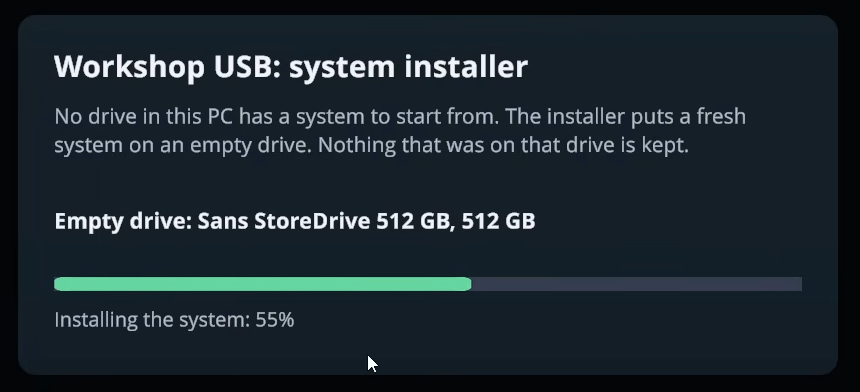
For a drive-replacement job, match the requested replacement to the job card and fit it while the PC is powered off. With the empty drive and Workshop USB installed, power on and open Monitor. Confirm the empty target drive in the system installer. Wait for the progress bar to finish and the PC to restart to its desktop.
 Open full-size image ↗
The installer lists the empty drive before the automatic restart. Creeativvez, 30:57. Use Try next if the installer can't see the drive
Read the installer message. Older launch builds could show No empty drive was found even when the new drive had just been fitted. Hotfix 1 makes the installer identify a drive the PC can't see and gives checks under Try next. Follow that prompt, confirm the replacement is fitted, then try booting again. Look for the empty target drive in the installer.
Open USB apps from the desktop
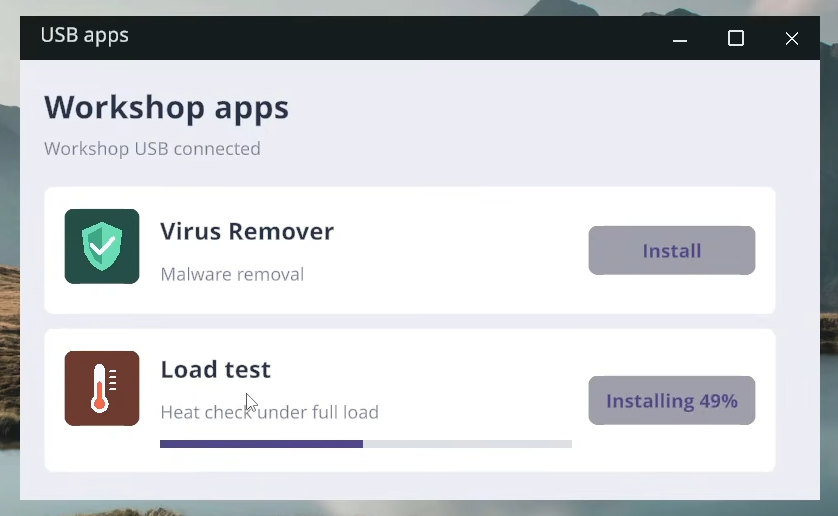
Open USB apps on the customer's desktop to bring up Workshop apps. Select Install beside the app the job needs, such as Load test. When it finishes, open the new desktop shortcut. Remove the Workshop USB when the software work is complete.
 Open full-size image ↗
USB apps on the in-game desktop lists the two workshop tools. Creeativvez, 31:11.
How to tell it worked
After a new system install, the PC restarts to its desktop and the install objective checks off. An installed workshop app appears as a desktop shortcut.
Troubleshooting
If the PC fails to detect the replacement drive, use the installer's Try next guidance on an updated game and confirm the empty drive appears before you continue.