How to Unlock Shop Licences in PC Store Together
On the shop PC, open Shop licences and choose Stock licences. Check the listed level, price, and products. When the range is available, choose Buy licence and confirm that it says Owned. Then order the newly unlocked cartons in Stock Store.
Updated · Steam release
Step by step
Choose a range in Shop licences
Open Shop licences from the shop PC desktop. Use Stock licences for products you want to sell boxed on the sales floor. The other tab, PC parts licences, covers workshop components. Use View products on a range to see what it unlocks and check the range's level, license fee, and stock cost before buying.
Early Stock licences shown in the launch build Range Shop level License cost What you unlock Shop essentials 1 Free The five starting products. This range already shows Owned. Sans Pro office 2 $100 Five more office accessories, including Basic Headphones and the Sans Office Webcam. Storage drives 3 $150 Boxed storage drives for the retail shelf. The launch example unlocked Sans StoreDrive 256 GB and 512 GB. Buy the Storage drives licence at Level 3
On the Storage drives row, check that the button now says Buy licence. Select it once and verify that the row changes to Owned. In the launch example, the license costs $150. The same row estimates $127.72 plus delivery for one carton of each listed drive, so set aside cash for the cartons as well as the license.
Order the unlocked products in Stock Store
Return to the shop PC desktop, open Stock Store, and look under PC parts → Storage. The newly unlocked drives appear with Add to cart. Pick one or both cartons based on your cash and shelf space. Order them, collect the delivery, and put the boxed drives on a sales shelf.
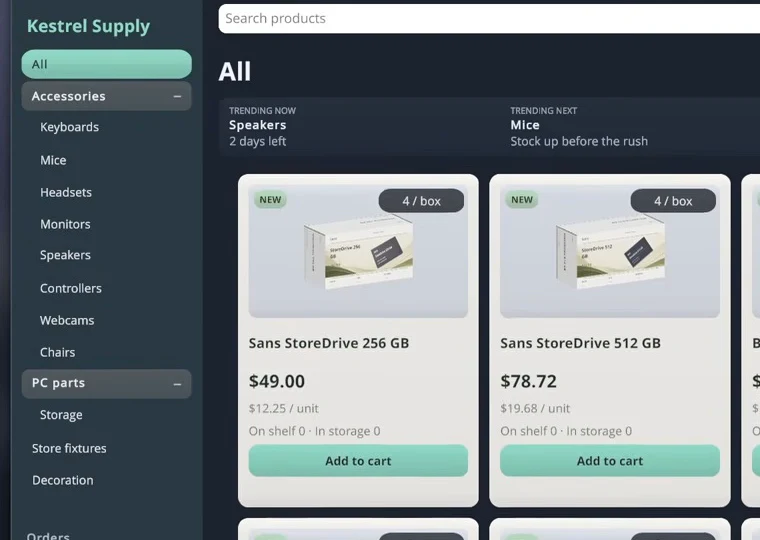
The license makes the cartons available to order in Stock Store.
How to tell it worked
Storage drives shows Owned in Shop licences, and you can add the boxed drives to your Stock Store cart.
Troubleshooting
If the button says Unlocks at level 3, check your current Store Reputation level and come back after you reach Level 3. If you already own the license but can't find the products, make sure you're in Stock Store. The PC Parts Store catalog is where you shop for individual workshop parts.