How to Set Retail Prices in PC Store Together
Stock a shelf, aim at the product's price tag, and open Set Price. Start with Market if it leaves enough profit per item, then confirm with Set Price. Use the shelf tag to verify the price. If several buyers say the product costs too much, move it closer to market price and watch the next sales.
Updated · Steam release
Step by step
Read the cost per product at Kestrel Supply
In Stock Store, read the supplier's price per unit under the carton price. For example, the Sans M20 Precision Mouse carton in the launch footage costs $59.90 for 10 mice, or $5.99 per mouse before delivery. Check the current carton price and delivery charge before buying the lot.
Open Set Price from the shelf tag
Unpack the carton onto a sales shelf. Aim at the small tag under the row of products and open Set Price. Check the product name, Market price, and Profit per item. Choose Market, use a percentage preset, or edit Your price directly. The percentage buttons are shortcuts. Confirm with Set Price and check the tag for your amount.
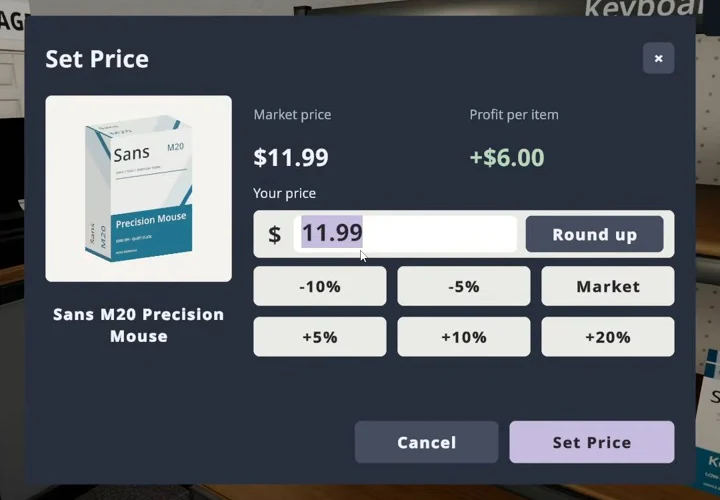
Check the market price and the resulting profit per item before confirming Your price. Adjust for demand and customer reactions
Use Market as a starting point when the price covers your unit cost and leaves enough room for delivery. Try small adjustments on one product at a time. Check Trending now and Trending next at Kestrel Supply before stocking for a rush. If shoppers repeatedly complain that a product costs too much, lower that product's price toward Market and compare the next sales. Use the display PC pricing guide when you're selling a machine you built.
How to tell it worked
The shelf tag shows the new price and the product scans at that amount during Checkout.
Troubleshooting
If the game says the shelves need prices, find a stocked product with a blank price tag and set it. If the tag targets the wrong product, back out, aim directly below the intended row, and check the product name in the dialog before confirming.